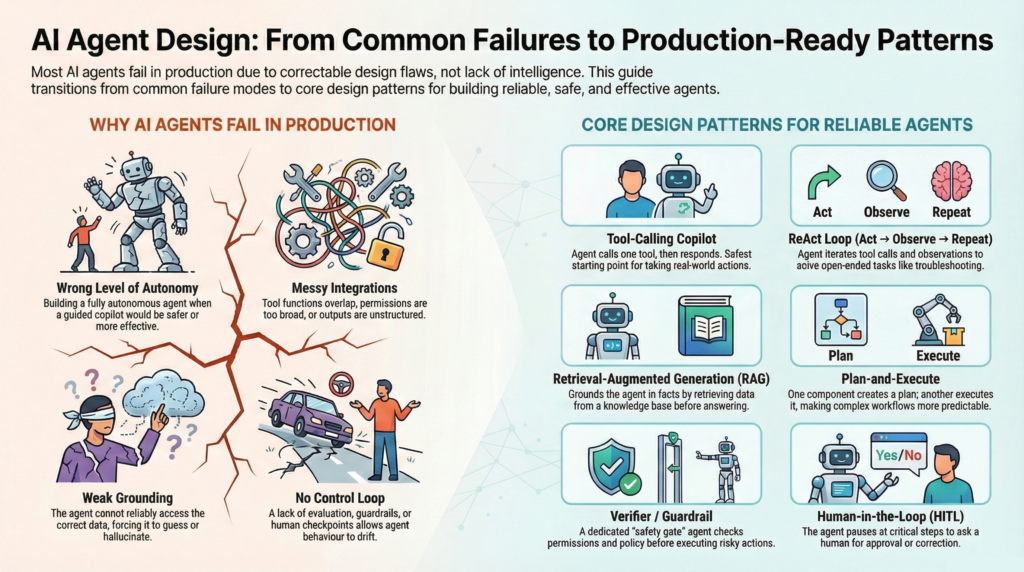
AI agents are everywhere—yet most companies struggle to get consistent value from them in production. The typical failure modes aren’t “the model is dumb,” they’re design mistakes:
- Wrong level of autonomy: you built a fully autonomous agent where a guided copilot would be safer (or vice-versa).
- Weak grounding: the agent can’t reliably access the correct data, so it guesses.
- Messy integrations: tools overlap, permissions are too broad, or outputs aren’t structured.
- No control loop: there’s no evaluation, guardrails, budgets, or human checkpoints—so behaviour drifts.
The fix is to treat “agent design” like software architecture: pick a pattern that matches your job, risk, data, and integration reality.
A simple diagram: how agents design and interact with the world
Most agent patterns are just different ways of wiring the same building blocks:
            ┌─────────────────────────────────────────────────┐
User/Trigger│  request / event                                │
───────────►└─────────────────────────────────────────────────┘
                     │
                     ▼
           ┌───────────────────────┐
           │   LLM / Agent Core    │  (reasoning, instructions)
           └───────────────────────┘
             ▲    ▲          │
             │    │          │ tool calls
   retrieved │    │ memory   ▼
   context   │    │   ┌──────────────────────┐
 (RAG/DB)    │    └──►│ Tool Router / Skills │───► APIs / DBs / Apps
             │        └──────────────────────┘        (the world)
             │                   │
             │              observations/results
             └───────────────────┘
                     │
                     ▼
           ┌───────────────────────┐
           │ Output / Action / Log  │
           └───────────────────────┘

Optional “safety & quality” add-ons:
- Evaluator/Critic (checks output) • Verifier/Policy gate (blocks risky actions)
- Human-in-the-loop checkpoint • Budgets/Stop conditions • Monitoring/Evals
Every pattern below is basically one of these blocks emphasised (single-shot vs loops, planning vs routing, retrieval vs tools, humans vs autonomy, etc.).
The AI agent design patterns (with examples + key features)
Note: there’s no single official “complete” list—new patterns emerge constantly. This is a comprehensive, production-oriented catalog of the patterns you’ll actually encounter and deploy.
1) Prompted Assistant (No tools)
A pure LLM that generates answers or content from its prompt and provided context. Great for drafting, summarising, explaining, and brainstorming—weak for tasks requiring real-world truth or actions.
Example use cases: blog writing, policy summaries, meeting notes, customer email drafts.
Key features
- No external calls; fastest and simplest
- Relies entirely on the provided context
- Best when mistakes are low-cost, and content is the output
2) Tool-Calling Copilot (Single-step function calling)
The agent chooses and calls one tool (e.g., “search CRM,” “create ticket,” “fetch KPI”), then responds. This is the safest “actionable” starting point for many teams.
Example use cases: create a Jira ticket, fetch account status, and look up SKU details.
Key features
- One tool called low latency and cost
- Easy to test and monitor
- Requires well-defined tool schemas + permissions
3) ReAct Loop (Act → Observe → Act…)
The agent iterates: calls tools, reads results, decides on the next step, and repeats until done. This is the “classic agent loop” for open-ended tasks.
Example use cases: investigate an incident across logs + dashboards, multi-step research, and troubleshooting.
Key features
- Uses feedback from the world to reduce guessing
- Needs stop conditions to avoid loops
- Works best with a small, clean toolset
4) Plan-and-Execute (Planner → Executor)
One component creates a plan; another executes it step-by-step, often with tool calls. More predictable than free-form looping.
Example use cases: onboarding workflow, “research → compute → draft → publish” pipelines.
Key features
- Clear milestones; easier progress tracking
- Plans can be revised mid-run
- Useful for tasks with known stages
5) Adaptive Re-Planning (Plan → Execute → Replan)
A stronger version of plan-and-execute, where the agent expects that reality will differ from the plan and re-plans when tool results contradict assumptions.
Example use cases: travel planning, procurement automation, dependency-heavy operations workflows.
Key features
- Robust to changes and failures
- Needs replan triggers (errors, missing data, low confidence)
- Prevents “blindly following a bad plan”
6) Task Decomposition (Self-Ask / Subquestioning)
The agent breaks a big problem into smaller questions, answers them, then synthesises. This improves structure and reduces omission.
Example use cases: market analysis, requirements definition, strategy memos.
Key features
- Better coverage of complex tasks
- Can be paired with retrieval or tools
- Watch for over-decomposition (wasted steps)
7) Reflection / Self-Revision (Draft → Critique → Improve)
The agent produces an initial output, critiques it, and then revises. Very effective for writing and reasoning quality—predominantly when guided by a rubric.
Example use cases: executive summaries, proposals, code refactors, policy checks.
Key features
- Improves quality with controlled iteration
- Needs iteration caps (avoid endless rewrites)
- Best when the evaluation criteria are explicit
8) Evaluator–Optimiser Loop (Critic model + Worker model)
Separate roles: one “worker” generates; one “evaluator” scores and gives targeted feedback; the worker rewrites until a threshold is met.
Example use cases: compliance-sensitive content, structured output generation, test-driven code generation.
Key features
- Higher reliability than self-critique
- Rubrics enable consistent quality gates
- Adds latency/cost; use for high-value outputs
9) Verifier / Guardrail Agent (Check-before-act)
A dedicated verifier checks tool arguments, policy compliance, permissions, and risk before actions are executed.
Example use cases: refunds, account changes, deleting data, and sending customer emails.
Key features
- Prevents dangerous tool misuse
- Adds “security gate” to autonomy
- Most useful for “irreversible actions”
10) Multi-Path Reasoning (Tree-of-Thought style)
The agent explores multiple candidate reasoning paths, compares them, and selects the best. Great when problems are tricky and single-pass reasoning fails.
Example use cases: complex planning, diagnosis, trade-off decisions, optimisation-like reasoning.
Key features
- Higher success on challenging problems
- Expensive; requires pruning/scoring
- Use selectively, not by default
11) Self-Consistency / Ensemble Voting
Generate multiple independent solutions, then vote/rank/merge. Simple and surprisingly effective at reducing brittle failures.
Example use cases: important explanations, decision recommendations, robust summaries.
Key features
- Reduces single-sample errors
- Easy to implement
- Cost scales with the number of samples
12) Retrieval-Augmented Generation (RAG)
Before answering, the agent retrieves relevant passages from a knowledge base (docs, tickets, policies) and grounds the response in them.
Example use cases: employee helpdesk, product support, policy Q&A, internal knowledge assistants.
Key features
- Significantly reduces hallucinations (when retrieval is good)
- Requires chunking, ranking, freshness, and permissions
- Best for “truth lives in documents” problems
13) Structured Query Agent (SQL/BI/API query planner)
Instead of “answering from vibes,” the agent formulates structured queries (SQL/GraphQL/API), executes them, then explains the results.
Example use cases: KPI assistant, financial reporting, inventory checks, supply chain performance Q&A.
Key features
- High factual reliability via source-of-truth systems
- Needs schema grounding + row-level security
- Logging and auditability are strong
14) Knowledge Graph Agent (Entity + relationship reasoning)
The agent navigates a graph of entities and relationships (customers, products, locations, dependencies) to answer “how things connect.”
Example use cases: root-cause analysis, dependency mapping, org/IT topology, supply network insights.
Key features
- Strong for “relationships” and “lineage”
- Pairs well with structured queries
- Requires good entity resolution / IDs
15) Code-Execution / Sandbox Agent (Tool-assisted computation)
The agent writes and executes code (often in a sandbox) for calculations, transformations, simulations, or data wrangling.
Example use cases: forecasting experiments, data cleaning, backtesting, and report generation.
Key features
- Accurate math/computation
- Needs sandboxing and resource limits
- Great for repeatable analytic tasks
16) Tool Router (Intent → best tool / best agent)
A router decides which toolset or specialist agent should handle the next step. This prevents one “god-agent” from attempting everything.
Example use cases: support triage (billing vs technical), enterprise assistants with many systems.
Key features
- Improves reliability through specialisation
- Routing can be rules-based or model-based
- Requires clean interfaces between tools/agents
17) Skills Library Pattern (Reusable deterministic procedures)
Encapsulate best-practice procedures as “skills” (small programs or workflows) that the agent can call reliably.
Example use cases: “create purchase order,” “resolve ticket,” “extract fields from PDF.”
Key features
- More consistent than prompt-only behaviour
- Reduces prompt complexity and drift
- Skills become a product surface (versioning matters)
18) Memory Patterns (Working / Semantic / Episodic)
The agent stores and recalls information across turns or sessions: short-term “working” context, long-term “facts,” and “experiences” (what worked before).
Example use cases: customer success assistants, personal productivity agents, repeated ops workflows.
Key features
- Better continuity and personalisation
- Needs governance: what to store, expiry, and correctness
- Privacy and security must be explicit
19) Event-Driven Agent (Triggers + handlers)
Instead of waiting for a user prompt, the agent reacts to events (new ticket, anomaly detected, SLA breach) and runs a playbook.
Example use cases: incident response, automated triage, finance ops alerts.
Key features
- Operates “in the background”
- Requires clear triggers and safe actions
- Strong need for audit logs + throttling
20) State Machine / Graph Orchestration (Explicit flow control)
The agent’s work is modelled as states and transitions (including retries, branching, and fallbacks). This is often the most production-friendly orchestration.
Example use cases: onboarding flows, claims processing, compliance workflows.
Key features
- Predictable, testable, observable
- Great for regulated or high-risk domains
- More engineering upfront, less chaos later
Multi-agent coordination patterns
21) Sequential Pipeline (Agent A → Agent B → Agent C)
A fixed chain where each agent has a role (researcher → writer → editor). Very effective for content and reporting.
Example use cases: weekly business review, market briefings, proposal assembly.
Key features
- Simple mental model
- Errors propagate; add validation checkpoints
- Great for repeatable deliverables
22) Parallel “Swarm” (Many agents in parallel + merge)
Multiple agents work simultaneously on different angles; a merger step consolidates them.
Example use cases: competitive research, brainstorming, risk identification.
Key features
- Fast coverage and diversity
- Needs merge/ranking logic
- Can be cost-heavy without limits
23) Supervisor–Worker (Manager agent delegates)
A supervisor agent decomposes tasks, assigns subtasks to specialist workers, and then integrates the results.
Example use cases: complex ops automation, multi-domain business assistants.
Key features
- Strong specialisation and coordination
- Requires clean task contracts
- Supervisor must enforce budgets and stop
24) Debate / Red-Team (Proposer vs Critic)
One agent proposes; another critiques aggressively; optionally, a judge decides. Great for decisions and risk.
Example use cases: pricing decisions, policy design, “should we ship?” reviews.
Key features
- Surfaces blind spots
- Needs a neutral scoring rubric
- Avoid endless arguments—cap rounds
25) Human-in-the-Loop (HITL) Checkpoints
The agent pauses at key points for approval, correction, or additional context.
Example use cases: customer communications, contract changes, medical/legal-like decisions (where applicable).
Key features
- Safest path to production value
- Keeps humans in control of irreversible actions
- Design checkpoints as decision points, not “FYI”
26) Autonomy Ladder (Graduated autonomy)
You intentionally move from assistant → copilot → supervised agent → limited autonomous agent as reliability improves.
Example use cases: rolling out AI support, ops automation, sales assistants.
Key features
- Minimises risk while proving ROI
- Forces measurement and learning before scaling autonomy
- Helps align stakeholders and compliance
27) Budgeted Agent (Cost/time/tool-call limits)
A pattern where budgets are first-class: max tool calls, max tokens, max time, max retries—plus graceful fallback.
Example use cases: any agent at scale, especially customer-facing or high-traffic.
Key features
- Prevents runaway loops and surprise bills
- Improves reliability under load
- Needs clear fallback behaviours (escalate / partial answer)
28) Observability-First Agent (Logs + traces + eval hooks)
Not “just a pattern,” but a production design: every decision and tool call is logged, traceable, and measurable.
Example use cases: enterprise deployments, regulated processes, high-SLA ops.
Key features
- Enables debugging and continuous improvement
- Supports compliance and audits
- Pairs well with evaluation harnesses
Checklist: How to pick the most appropriate AI agent design
Use this to choose the correct pattern in minutes:
- Define the job as an outcome
- What changes if the agent succeeds? (time saved, tickets resolved, revenue, reduced risk)
- Choose an autonomy level
- Draft-only? Suggest + ask for approval? Act autonomously?
- If mistakes are costly, start with Copilot + HITL.
- Identify where “truth” lives
- Docs → use RAG
- Databases/KPIs → use a Structured Query Agent
- Relationships/lineage → consider a Knowledge Graph Agent
- Map the task shape
- Predictable steps → State machine/pipeline
- Unpredictable steps → ReAct or Plan-and-Execute + re-planning
- Design tools and integrations are deliberately
- Minimise tool overlap
- Separate read vs write tools
- Enforce permissions and argument validation
- Add safety gates at irreversible actions
- Use Verifier/Guardrail and/or Human approval for high-risk steps
- Add budgets and stop conditions
- Max iterations, retries, time, and cost
- Define graceful fallback (escalate, ask, partial result)
- Decide if you need a multi-agent
- Use multi-agent only if specialisation measurably improves outcomes (routing, parallel research, red-teaming)
- Measure before you scale
- Define success metrics + eval sets
- Monitor hallucinations, tool errors, latency, and customer impact
- Climb the autonomy ladder
- Start simple, prove reliability, then increase autonomy in controlled steps.